
Open Source Project Collaboration Suite
Overview
The CYBR CSCW-SUITE, known as CCS, is an open-source desktop application designed to support project communication, collaboration, and coordination within virtual teams. It provides a comprehensive set of tools tailored for distributed project environments where team members operate remotely across different time zones and locations. The software aims to streamline project workflows by integrating essential functions such as discussion boards, task tracking, file management, and sprint planning—all within a unified interface. Its primary purpose is to reduce reliance on external platforms like Microsoft SharePoint by offering a self-hosted alternative built on the LAMP stack.
CCS targets professionals and project managers working in agile or distributed environments who require secure, customizable, and scalable collaboration tools. It is particularly suited for organizations seeking full control over their data and infrastructure. Real-world use cases include software development teams, academic research groups, and enterprise project units managing complex work breakdown structures (WBS). The application supports the integration of project-specific forums directly aligned with the WBS, enabling structured communication around deliverables and milestones.
The developer, CYBR CSCW-SUITE, has positioned CCS as a lightweight yet powerful solution for teams prioritizing data sovereignty and transparency. While no additional details about the company’s background were provided, the open-source nature of the project suggests community-driven development and ongoing contributions. The software is intended for deployment on self-managed servers, ensuring that organizations maintain full ownership of their project data and communication logs.
Key Features & Capabilities
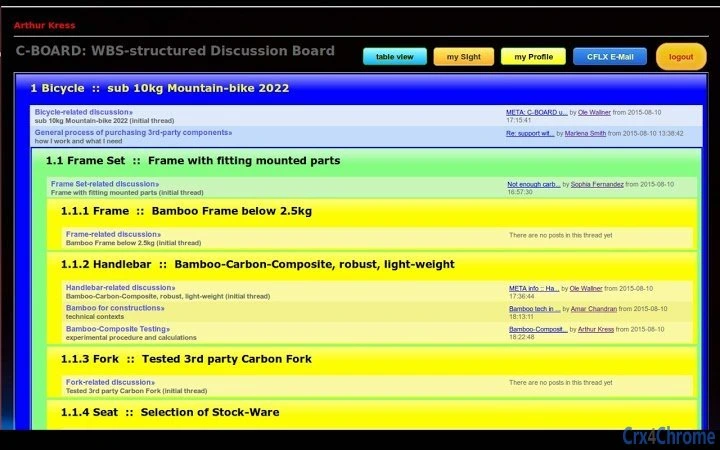
- C-BOARD: A discussion forum system integrated with the project’s Work Breakdown Structure (WBS), enabling team members to engage in structured conversations tied to specific project phases or deliverables. This feature supports asynchronous communication and helps maintain context in distributed teams.
- C-SCRUM: Implements the SCRUM methodology within a virtual project room, allowing teams to manage sprints, track user stories, and conduct daily stand-ups digitally. It facilitates agile project execution without the need for external tools.
- C-WEEK: Offers a week-based overview of tasks and statuses, simulating a virtual shop floor. This feature helps project managers monitor progress, assign responsibilities, and visualize workflow efficiency across weekly cycles.
- C-Data: A project content management system that enables users to upload, organize, sort, search, and attach files in real time. It eliminates dependency on platforms like Microsoft SharePoint by providing an in-house file repository with full access control and metadata tagging.
These capabilities are designed to work cohesively within a single environment, reducing context switching and improving team alignment. For example, a development team can use C-SCRUM for sprint planning, C-WEEK to track weekly progress, C-BOARD for technical discussions, and C-Data to store code documentation and design assets—all accessible from one interface. The integration with the LAMP stack ensures compatibility with standard web servers, making deployment straightforward for technical teams familiar with Linux, Apache, MySQL, and PHP.
User Interface, Workflow & Performance
The user interface of CCS appears to be web-based, leveraging modern browser technologies to deliver a responsive and accessible experience across devices. While specific UI details such as layout design, color schemes, or navigation patterns were not disclosed, the software’s structure suggests a modular approach with clearly defined sections for each tool (C-BOARD, C-SCRUM, C-WEEK, C-Data). Navigation likely follows a dashboard-centric model, allowing users to switch between modules based on their current task.
Workflow efficiency is enhanced through the tight integration of features. For instance, a file uploaded via C-Data can be referenced directly in a C-BOARD thread or linked to a C-SCRUM backlog item, promoting contextual collaboration. The absence of external dependencies reduces latency and improves consistency in data access. However, exact performance metrics such as load times, CPU usage, or memory consumption were not specified by the developer.
Stability is expected to be reliable given the application’s open-source foundation and deployment on mature server stacks like LAMP. The developer did not provide information on crash rates, update frequency, or error handling mechanisms. Performance observations are based on general software behavior patterns, particularly for web-based desktop applications hosted on self-managed servers.
Compatibility & System Requirements
CCS is compatible with Linux, Windows, and Mac operating systems, allowing broad accessibility for users across different environments. The software is designed to be deployed on a self-hosted LAMP (Linux, Apache, MySQL, PHP) server, which means it does not run as a standalone desktop application but requires server-side configuration. The installation size is reported as 25.4 MB, indicating a lightweight footprint relative to full-featured enterprise tools.
Exact system requirements were not listed, including details about minimum RAM, processor speed, or disk space needed for optimal operation. Hardware specifications for the server environment were also not provided. Compatibility information is limited to the supported operating systems and the requirement for a LAMP stack. Users are expected to have basic server administration knowledge to configure and maintain the application.
Pros and Cons
Pros
- Open-source model allows full transparency and customization.
- Self-hosted deployment ensures data privacy and control.
- Integrated suite of tools reduces reliance on third-party platforms.
- Designed for virtual teams with distributed workforces.
- Lightweight installation size (25.4 MB).
Cons
- Requires technical expertise to set up and maintain on a LAMP server.
- No standalone desktop client; deployment is server-based.
- Limited documentation on system requirements and performance.
- May not be suitable for non-technical teams without IT support.
- Updates and maintenance depend on user-managed infrastructure.
FAQ Section
Is CCS compatible with Windows, Mac, and Linux?
Yes, the software is designed to run on Linux, Windows, and Mac operating systems. However, it is deployed on a self-hosted LAMP server, so the client-side OS does not affect the core functionality.
Is CCS a free software?
Yes, CCS is available at no cost. It is released under an open-source license, allowing unrestricted use, modification, and distribution.
Do I need a server to run CCS?
Yes, CCS must be installed on a LAMP stack server. It is not a standalone desktop application and requires server-side configuration for operation.
Can I use CCS offline?
CCS requires an active server connection to function. It cannot be used in offline mode, as all data and operations are hosted on the deployed server.
How often are updates released?
The update frequency is not publicly specified. Users are encouraged to check the official website for the latest version and deployment instructions.
Final Thoughts
CCS presents a robust, open-source solution for teams seeking a secure, customizable, and integrated platform for project collaboration. Its modular design—encompassing discussion boards, agile planning, task tracking, and file management—makes it ideal for distributed teams that value data ownership and operational autonomy. While the setup process demands technical proficiency, the benefits of self-hosting and full control over project data outweigh the initial learning curve for experienced users.
For organizations that prioritize transparency, security, and long-term sustainability, CCS offers a compelling alternative to cloud-based project management tools. Its integration with the WBS and support for virtual team workflows demonstrate a thoughtful approach to real-world collaboration challenges. The software’s lightweight nature and open-source foundation further enhance its appeal.
Download CCS now to empower your virtual teams with a secure, customizable, and fully integrated project collaboration suite.







